
Total control of your Android fleet.
Secure, configure and track every corporate Android device from one dashboard. OptaLock keeps your fleet focused on the job: in the store, on the road or in the field.
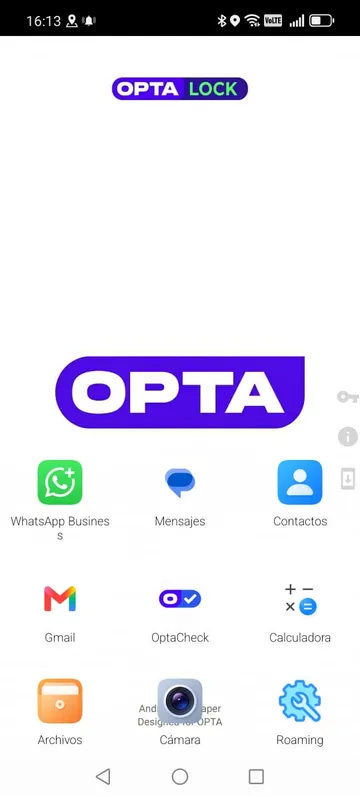
Total control
Decide exactly what every device can do (apps, hardware and connectivity) and enforce it remotely.
Security
Lock, wipe and recover lost devices. Company data stays protected wherever devices travel.
Management at scale
Configure once, apply everywhere. Group-based policies manage 10 or 500 devices with the same effort.
Visibility
Live inventory, location and health for the whole fleet: battery, connectivity, versions and activity.
Everything you need to run an Android fleet.
From first enrollment to daily operations, OptaLock covers the full lifecycle of your corporate devices.
Centralized device management
A live inventory of your whole fleet: online status, battery, Android version, IMEI and model, searchable and exportable.
- Inventory
- Status
- Battery
- IMEI
Group-based policies
Build a configuration once and apply it to entire device groups. New devices inherit the right rules automatically.
- Groups
- Reusable configs
Connectivity and hardware control
Manage GPS, Bluetooth, Wi-Fi and mobile data per policy. Lock USB storage and set screen brightness and timeout.
- GPS
- Wi-Fi
- USB lock
Kiosk mode and custom home screen
Lock devices to the apps that matter, with your branding: background, icons, title and screen orientation.
- Kiosk
- Branding
Remote app deployment
Maintain an app catalog and install remotely by APK or URL. You can even turn any website into an app on the device.
- Catalog
- APK / URL
- Web apps
Location on a map
See every device on a live fleet map with GPS tracking and know where your equipment is at all times.
- GPS tracking
- Fleet map
Remote commands and messaging
Reboot devices, run or uninstall apps, exit kiosk mode or send pager-style messages to any device, with full history.
- Commands
- Push messages
Remote lock and lost devices
Immobilize or factory-reset a device the moment it goes missing.
- Remote lock
- Wipe
Dashboard, audit and logs
Fleet status and enrollment summaries at a glance, with full audit trails, logs and a multi-language console.
- Audit
- Multi-language
Want to see these features on your own devices?
Book a demoBuilt for the way your industry works.
Retail and distribution
Hand sales reps and promoters a device that only runs your sales tools. Kiosk mode keeps devices on task; inventory and location keep them accountable.
- Kiosk mode with your branding
- App catalog per store group
- Live device inventory
Logistics and field teams
Track courier and field-team devices, enable or disable apps and troubleshoot remotely, with no trips to headquarters.
- GPS fleet map
- Remote commands and messaging
- Over-the-air app updates
Corporate security
Enforce security policies fleet-wide: lock USB storage, control connectivity, audit every action and segment administrative access by role.
- Hardware and connectivity control
- Audit trails and logs
- Role-based access
Up and running in three steps.
- 01
Enroll
Scan a QR code and the device starts its setup process.
- 02
Configure by groups
Create a policy once (apps, kiosk, hardware rules) and assign it to device groups. New devices inherit it instantly.
- 03
Manage and monitor
Watch the dashboard, locate devices on the map, send commands and messages, and audit everything from one place.

OptaCheck, for the team in the field.
OptaLock manages the devices. OptaCheck coordinates the work of the people who use them: what they have to do and where they are.
- Work assignments
- Real-time location
- Geofences

Ready to take control?
Tell us about your fleet and we’ll show you OptaLock live.